Bio-Health SaaS Platform
Designing a scalable, AI-enhanced SaaS platform for complex health and bio research
Phased interaction model
State-aware research stages
Contextual AI
A health-focused SaaS platform designed to support researchers and scientific stakeholders in navigating complex bio workflows. The system integrates structured workflows, configurable research stages, and contextual AI assistance to transform fragmented tools into a unified, scalable decision-support platform.
Role
Product Designer (System Architecture, UX, AI Integration)
Responsibilities
UI & UX Research, Information Architecture, AI Interaction Strategy, User Testing & Iteration
Client
GenBio AI
Tools
Figma, System Mapping, AI Prompt Modeling
Duration
6–8 Weeks
PROJECT BRIEF
In health and bio research, existing tools are extremely powerful, but also extremely complex.
Even experienced researchers struggle with dense data, layered visualizations, and configuration-heavy interfaces. Most platforms are built for computation, not usability.
As a result, workflows become fragmented, difficult to navigate, and hard to interpret
— especially for users with different levels of expertise.
The goal of this project was to design a scalable SaaS platform that makes complex research workflows structured, understandable, and more accessible, integrating AI in a way that supports interpretation while keeping users in control.
RESEARCH DISCOVERY
Before designing solutions, I structured research into three phases:
Exploration → Analysis → Evaluation
Phase 1 — Exploration
Domain & Stakeholders
Understand how researchers currently explore biological data and where friction occurs.
Phase 2 — Analysis
Landscape & Gaps
Identify structural gaps between data processing, visualization, and interpretation.
Phase 3 — Evaluation
Workflow Assumptions
Test early concept scenarios to validate how users reason across research stages.
PROBLEM STATEMENT
“How can complex research workflows be structured, so users can
work confidently, make decisions, and return to the product over time?”
From Pain points to Design Opportunity
Model Ambiguity

“I’m not sure which model fits my dataset, everything looks similar."
Configuration Anxiety
“I don’t know what I actually need to configure.”
Lack of Transparency
“When it runs, I don’t really know what’s happening.”

SOLUTION
From Exploration to Execution, Without Configuration Overload
Rather than simplifying biological complexity,
the workflow was restructured.
Phase 1 — Entry & Selection
Structured Discovery. Deliberate Start.
Phase 1 reframes entry as a structured decision path —
reducing configuration anxiety while preserving researcher autonomy.
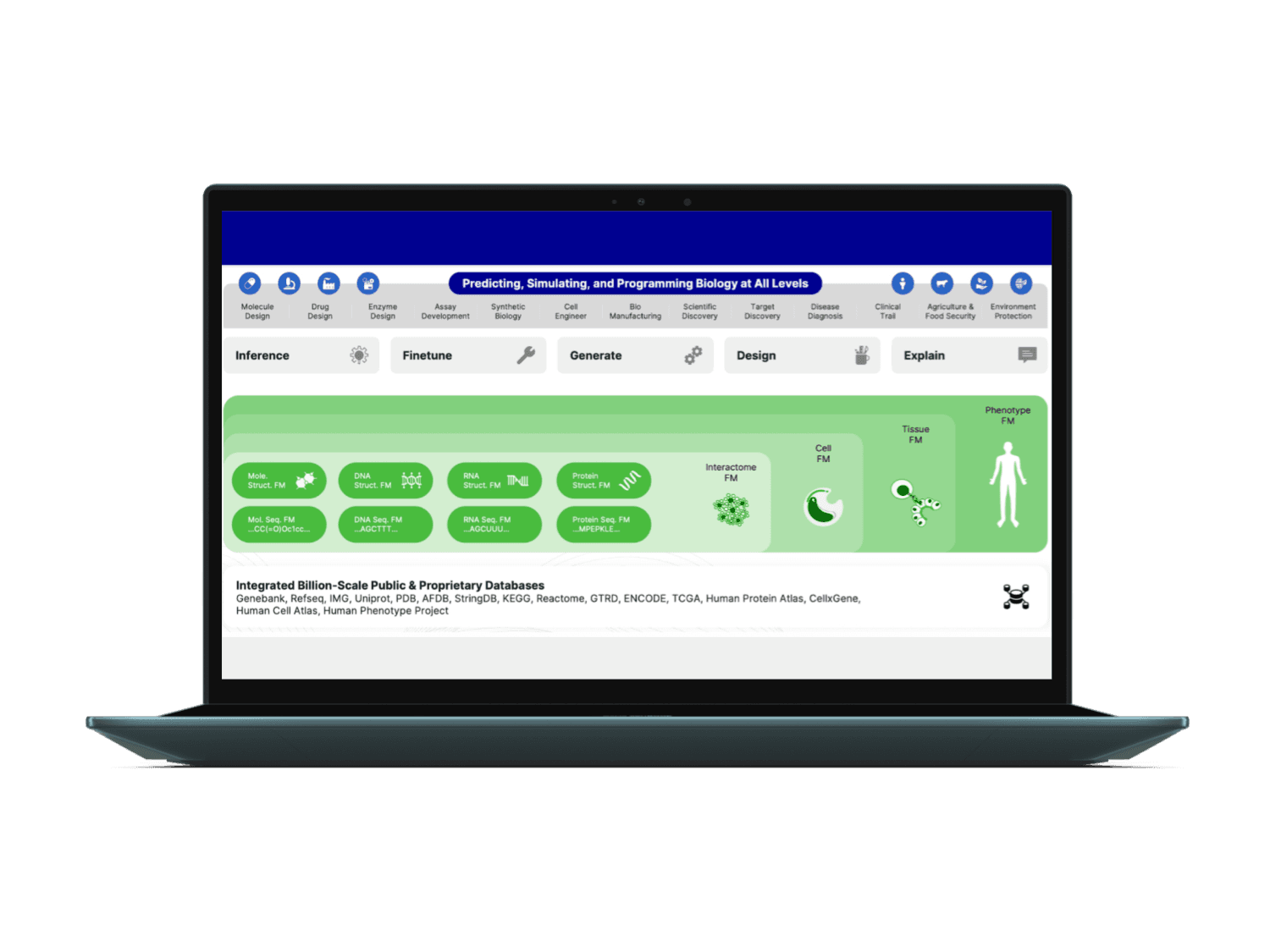
Intelligent Model Discovery
Structured filtering surfaces relevant foundation models instantly.
Discovery becomes targeted, not exploratory.
Biological level segmentation
Use-case filtering
Persistent filter visibility
III. Transparent Execution States
Processing is not opaque.
Users remain oriented at every step.
Stage-based progress indicators
Clear execution labeling
Start from curated example datasets
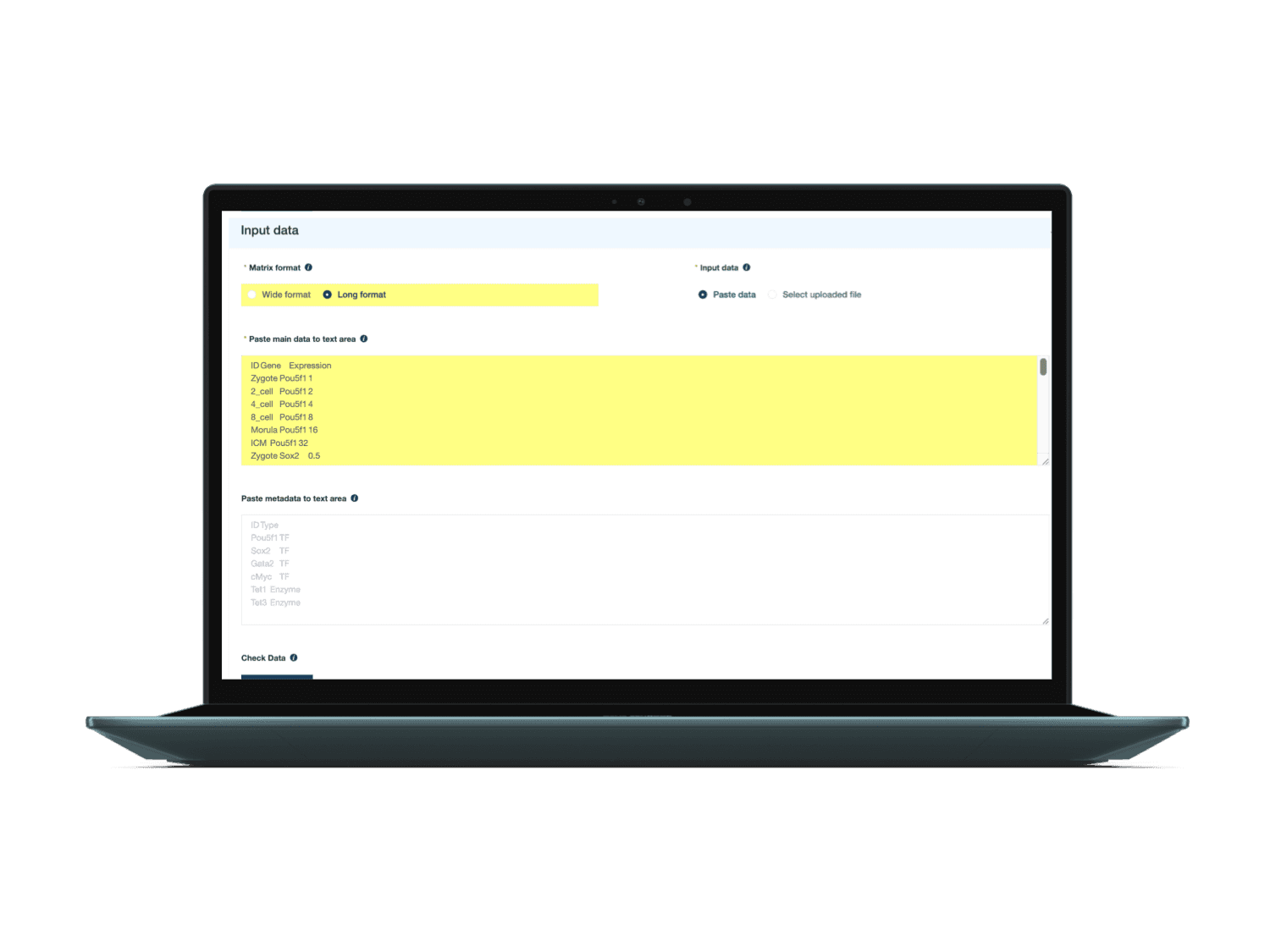
II. Progressive Data Onboarding
Multiple entry paths. Clear confirmation. Controlled flexibility.
File upload
Direct sequence input
Curated example datasets
Live visualization preview
Defaults accelerate momentum.
Advanced controls remain available
— not intrusive.
Sensible safe defaults for most users
Advanced sliders for optional expert control
Phase 2 — Results & Interpretation
Streamlined Exploration. Legible Insight.
Phase 2 reorganizes model output into an analytical workspace —
where structural patterns are explored, refined, and translated into insight.
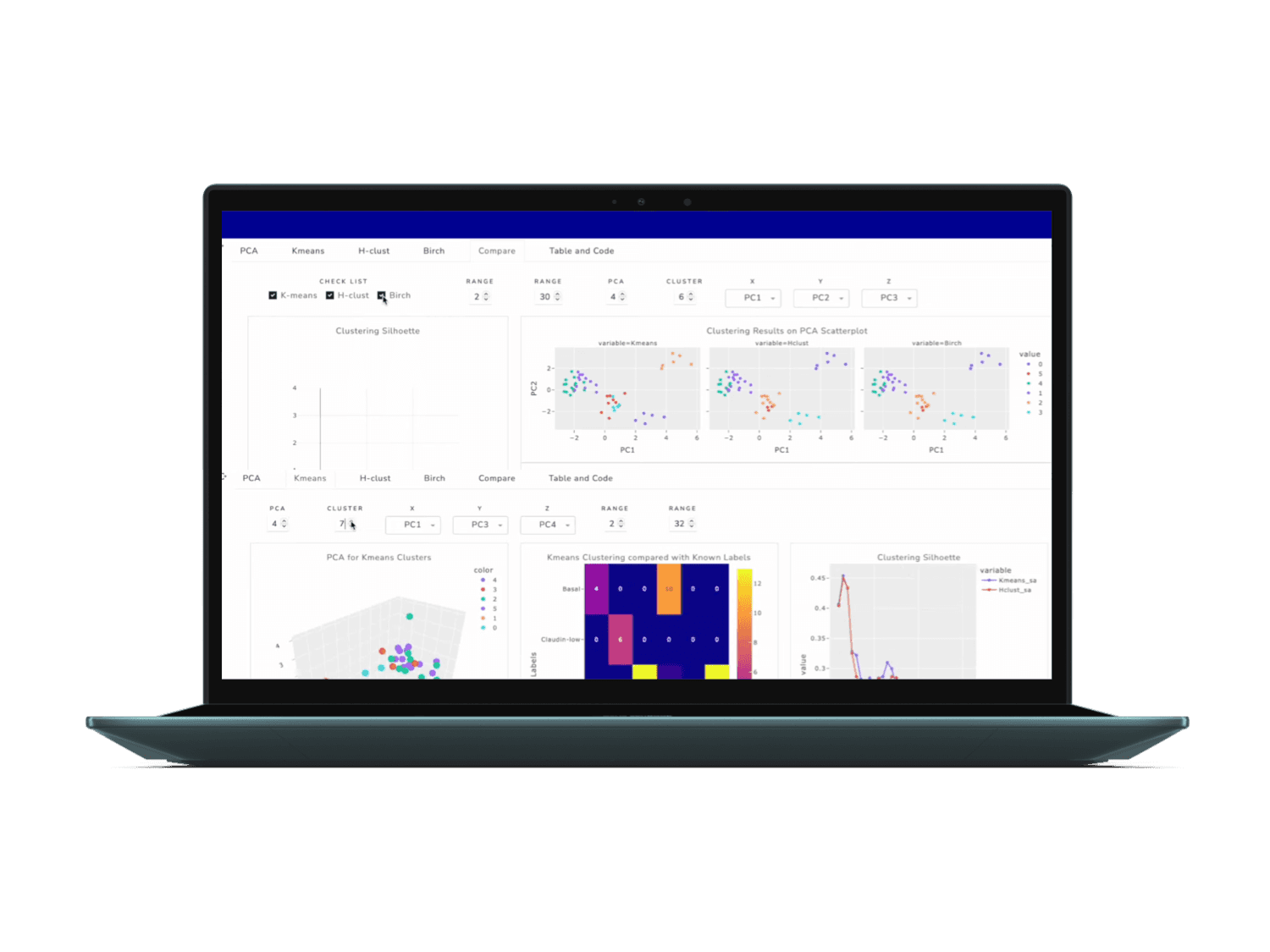
Multi-View Analytical Framework
Results are modularized into perspective-based analytical frames.
Complexity distributed across structured viewpoints.
Perspective-based view segmentation
Consistent interaction language
Modular visualization tabs
II. Contextual Interaction Encoding
Progressive structural meaning revealed through interactive visual logic.
Hierarchy externalized through interaction.
Hover-based contextual disclosure
Confidence-weighted edge encoding
Real-time topology reconfiguration
III. Layered Analytical Control
Deliberate separation of interpretation and refinement.
Flexibility contained within structure.
Persistent visual logic clarification
Adjustable signal refinement
Scope-based filtering controls
IV. Integrated Insight Layer
Structural findings scaffolded into communicable artifacts.
Analytical output structured for interpretation.
Hierarchical pattern surfacing
Modular cluster abstraction
Summary-ready synthesis
However…
When Exploration Ends, Interpretation Still Demands Judgment.
Phase 1 reduced friction.
Phase 2 structured complexity.
But insight formation still required cognitive translation.
LIMITATION
Even with structured workflow, three main gaps remained.
At this point, I reframed the design question, how can AI assist inquiry, synthesis, and continuity without replacing human reasoning.
Inquiry framing gap
Users still want to explore more,
but the system did not help them decide what question to ask next.
Interpretation-to-Language Gap
Users still need to put cognitive effort to translate results into explanation or narrative.
Research Continuity Gap
Users want to recall why a question was asked, or how the reasoning evolved over time.
Reframing Design Question
How should an AI assistant support deeper and accessible interpretation — without breaking context or workflow?
Design Judgment for AI Integration
AI as “cognitive supporter”
An explanatory layer that translates results into accessible language and narrative without altering user control.
AI as “workflow navigator”
A guided inquiry layer that helps researchers structure exploration and identify meaningful next questions within complex analysis workflows.
AI as “contextual copilot”
A state-aware collaborator that preserves research context, helping users track how questions evolve and how insights emerge over time.
SOLUTION WITH AI
Augmented Interpretation. Continuous Reasoning.
Phase 3 — AI Integration
Phase 3 embeds AI directly within the analytical flow
— transforming interpretation from manual translation into supported inquiry.
AI Assistant Chat
AI operates inside the analytical state, grounded in current visuals and evidence.
Inquiry becomes guided, not automated.
Deeper explanations with relevant visuals
Follow-up question scaffolding
Saveable insight capture
Users can get some more usable insights and expand their journey simply by accessing relevant options.
AI-suggested questions guide exploration
Natural language input pillar
II. Personalized Research Dashboard
Insights are captured, organized, and traceable across sessions.
Exploration becomes cumulative, not episodic.
Timestamp-linked navigation
Saved insight repository
Open question tracking
IMPACT
To evaluate GenBio’s interpretation workflow, I conducted pilot walkthroughs with primary researchers and compared it against existing bioinformatics tools.
Across testing, participants reported a shift from fragmented analysis across multiple tools to a structured, guided interpretation flow. Instead of manually switching between visualizations, notes, and external references, researchers could explore, question, and synthesize insights within a continuous analytical environment.
“I don’t have to mentally track everything anymore. The system shows me what matters, and I can follow the reasoning step by step.”
— Research participant
Reduced Interpretation Time
Researchers completed structured interpretation tasks faster compared to multi-tool workflows.
Improved Insight Recall
Participants were able to revisit prior findings and explain reasoning more accurately.
Increased Confidence in Results
Researchers reported greater trust due to visible evidence blocks and confidence scoring.
KEY TAKEAWAYS
Leading this project as a Product Designer pushed me to think beyond individual interfaces and focus on how systems help people make decisions in complex, information-dense environments.
Even though this was a proposal-level project, it reflects how I approach real product problems — structuring complexity, integrating AI thoughtfully, and designing systems that users can trust over time.
01. Designing Health Workflows
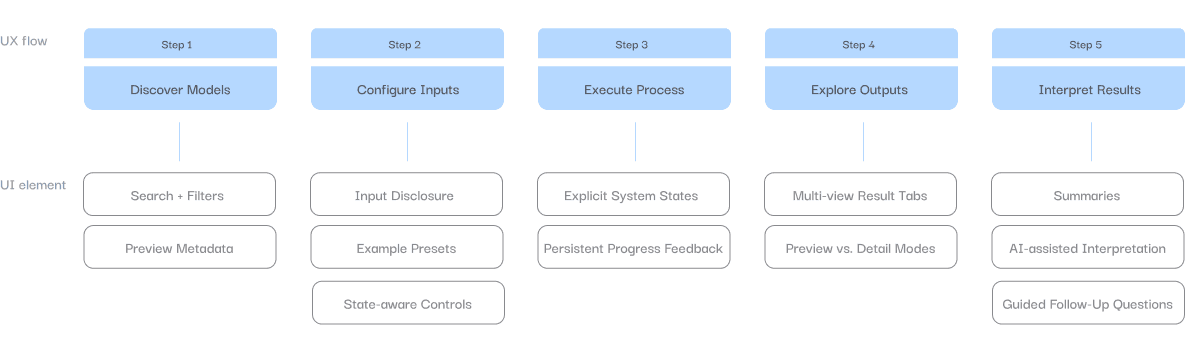
Designing for health and scientific domains requires clarity in environments where the information itself is complex. Instead of simplifying the data, I focused on structuring the workflow so users can move step-by-step through the process — discovering models, configuring inputs, exploring results, and interpreting insights.
Position #2
Position #3
Position #4
Position #5
Position #6
02. Thoughtful AI Integration
AI was intentionally designed as a supporting system, not a shortcut. Rather than automating the entire workflow, I integrated AI within the interpretation stage so it could explain patterns, surface evidence, and guide follow-up questions while staying grounded in the user’s current context.
Position #2
Position #3
Position #4
Position #5
Position #6
03. Scalable System Thinking
Throughout the project, I approached the product as a system, not just a set of screens. I defined a clear workflow architecture and designed components that align with how engineering teams could realistically build and extend the platform. Thinking about scalability early helps reduce future rework and ensures the product can evolve as new models, datasets, and AI capabilities are introduced.
Position #2
Position #3
Position #4
Position #5
Position #6
UX Flow & System Architecture
Before designing the interface, I mapped the entire research workflow to understand how scientists move from discovering models to interpreting results.
Instead of exposing the full analytical complexity at once, the system is structured into five sequential stages that separate configuration, execution, exploration, and interpretation.