Selected Work / AI Product Design
Spree AI
AI Styling Assistant
A multimodal AI shopping assistant that reduces decision fatigue across the entire purchase journey.
Conversational AI System
Multimodal Interaction
3D Try-On Experience
My Role — Product Designer (Team of 4)
Research & Synthesis · UX Strategy · Feature Definition · Information Architecture & User Flows · AI Interaction Behavior
Team /
4 Product Designers
Timeline /
AUG — OCT 2024
Tools /
Figma · Framer · ProtoPie · After Effects · Cinema 4D · Luma AI
ORIGINAL TEAM PROJECT · EXTENDED INTO AN INDEPENDENT WORKING CHROME EXTENSION (2026)
Project Scope /
From product research to a working AI shopping experience.
Research, interaction strategy, multimodal product design, evaluation, and independent product extension across the evolution of Spree AI.
Original Team Project · Aug — Oct 2024
Independent Extension · 2026
01 / Investigate
background · research question
02 / Frame
painpoints · opportunities
03 / Design the AI System
persona · CUI states · flows
04 / Build the Experience
multimodal · AI interaction
05 / Prototype & Evaluate
usability testing · reiterate
06 / Extend
Chrome Extension
team project
completed
Aug 2024
Sep 2024
Oct 2024
2026
01 / Investigate
·
Desk research
·
Product audit
·
15 interviews · 40+ surveys
02 / Frame
·
3 behavioral patterns
·
Opportunity areas
·
AI interaction strategy
03 / AI System
·
Mira personality system
·
CUI states
·
IA & user flows
04 / Experience
·
Multimodal interaction
·
Visual recognition
·
3D virtual try-on
05 / Evaluate
·
Interactive prototypes
·
Usability testing
·
Interaction refinement
06 / Extend · 2026
·
Cross-site try-on
·
Avatar & outfit layering
·
Working product prototype
Strategy / The Product
Meet Mira.
The persistent AI companion inside Spree AI.
Mira is the AI companion behind Spree AI.
It remembers context before, during, and after shopping—so every interaction builds on the last.

Experience Architecture /
Mira is a persistent AI companion that carries memory and context across every interaction. Rather than exposing isolated features, every capability is accessed through one continuous conversation.
Mira Home, Single Context Layer

MIRA IN ACTION /

AI Persona System /
One companion,
different personalities.
Same intelligence. Same memory. Your preferred tone.
Users choose one of the personalities during onboarding. Mira keeps the same intelligence, memory, and shopping context throughout every interaction—only its communication style changes.

PERSONALITY INTERACTION /
Choose how Mira communicates.

SWIPE
Touch
Explore personalities.

TAP
Touch
Select your companion.
PERSONALITY SYSTEM /
Explore different communication styles.




Witty Mira
Witty
Playful
Sarcastic
“No pressure, but I'm basically a fashion genius.”
Best for casual, playful conversations.

Optimistic Mira
Optimistic
Energetic
Friendly
“I'm here to help you discover your perfect style.”
Best for supportive, confident decisions.

Sharp Mira
Sharp
Sleek
Direct
“Let's get straight to it — your style deserves the best.”
Best for fast, focused shopping decisions.
Conversation /
Same recommendation. Different voice.


SHOPPING JOURNEY /
One assistant,
three shopping moments.
From onboarding to purchase and beyond, Mira adapts to each stage of the shopping journey.
1 / Before Purchase
2 / During Purchase
3 / After Purchase
Onboarding with AI /
Before Purchase
Personalized Setup
Building confidence before every purchase.
CUI Personality Customization
Style Profile Creation
Brand Affinity Selection
Personalized onboarding steps reduce uncertainty before shopping.

01 / “Hi, I’m mira — Your Personal Fashion Stylist”

02 / “Let’s Find Your Stylist”

03 / “Tell Me About Your Style (pick 3)”

04 / “Your Go-To Brands”

05 / “Curating your personalized experience…”

06 / mira home
01 / AI Personality Selection
Choose a voice.
Select how Mira communicates before every recommendation.
02 / Style Profile Creation
Define your style.
Shape your profile with three visual keywords.
03 / Brand Affinity Selection
Narrow the search.
Start with the brands you already love.
1 / Before Purchase
2 / During Purchase
3 / After Purchase
Exploring with AI /
During Purchase
Guided Decision Making
Helping users evaluate, compare, and decide with confidence.
01 / Smart Photo Recognition
Find similar products instantly.


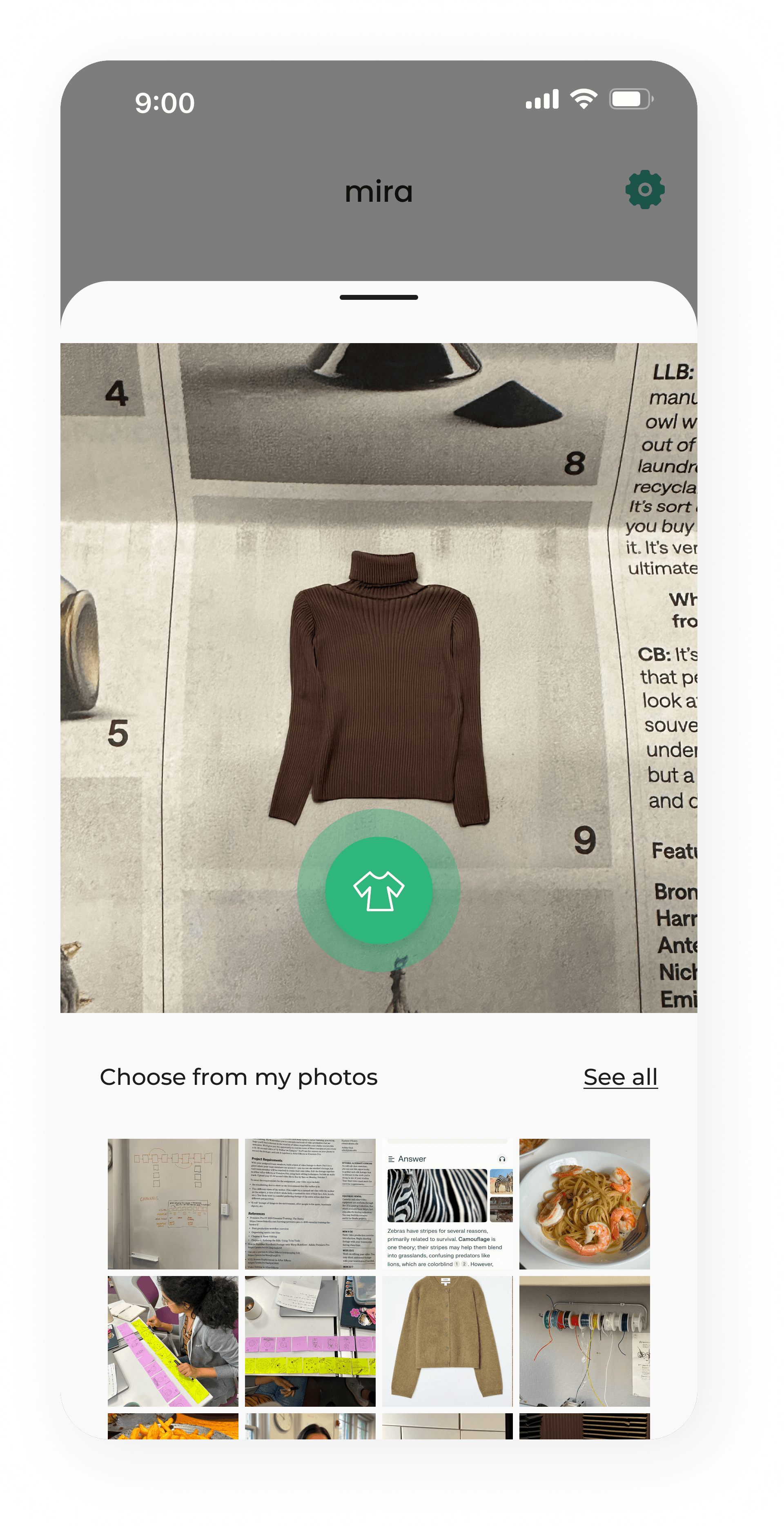

REFERENCE INPUT /
Upload a photo from social media, magazines, or your own gallery to start the search.
VISUAL MATCHING /
Mira identifies visually similar products while preserving the user's final decision.
02 / 3D Virtual Try-On
Preview outfits on yourself.

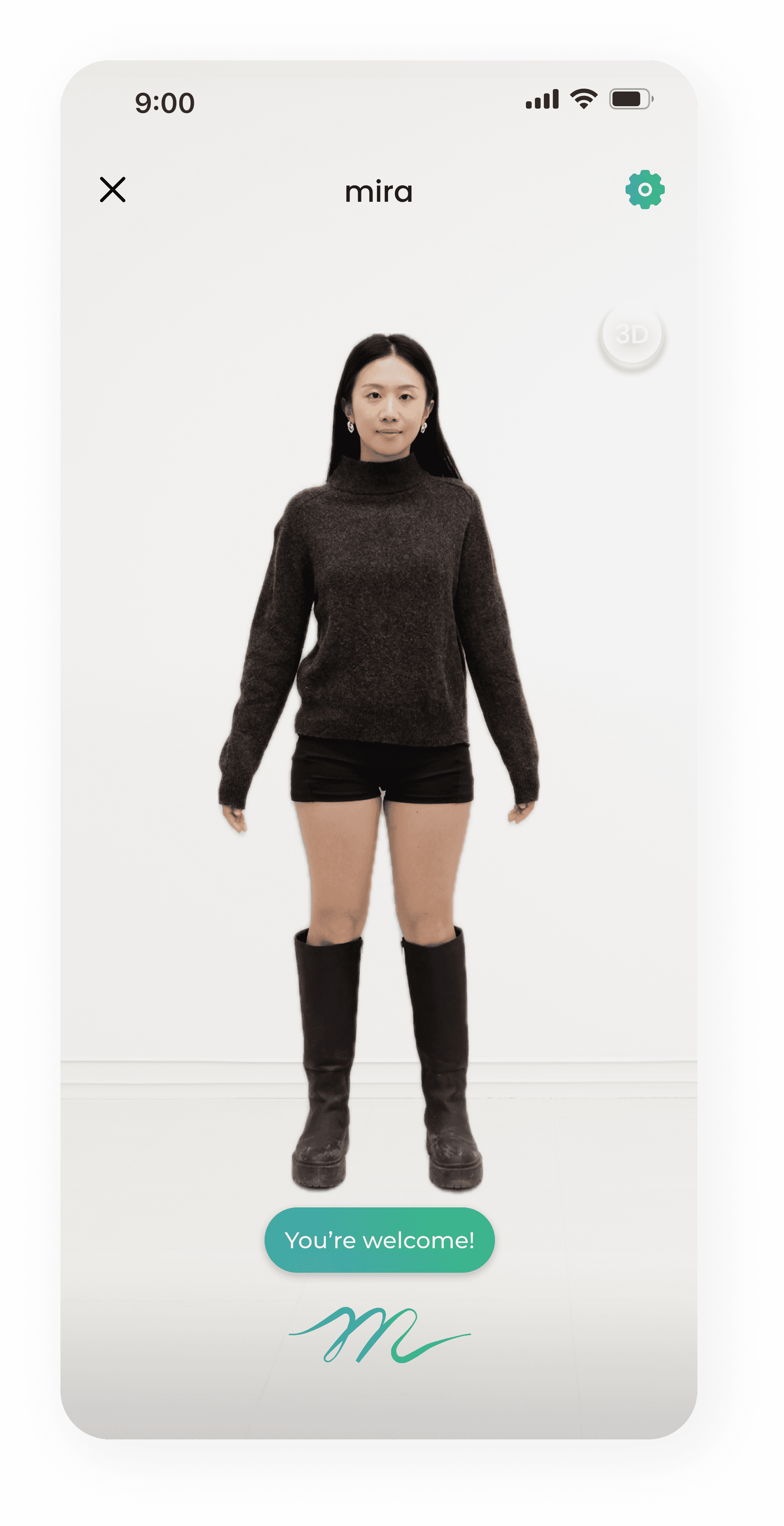


PERSONALIZED AVATAR /
Generates a realistic try-on using the user's body profile and measurements.
COMPARE BEFORE PURCHASE /
Preview different outfits instantly before making a purchase decision.
03 / Size Check Preview
Find your best fit.
AI SIZE RECOMMENDATION /
Recommends the best size based on body measurements and garment fit.
FIT CONFIDENCE /
Compare fit options before ordering to reduce uncertainty and returns.


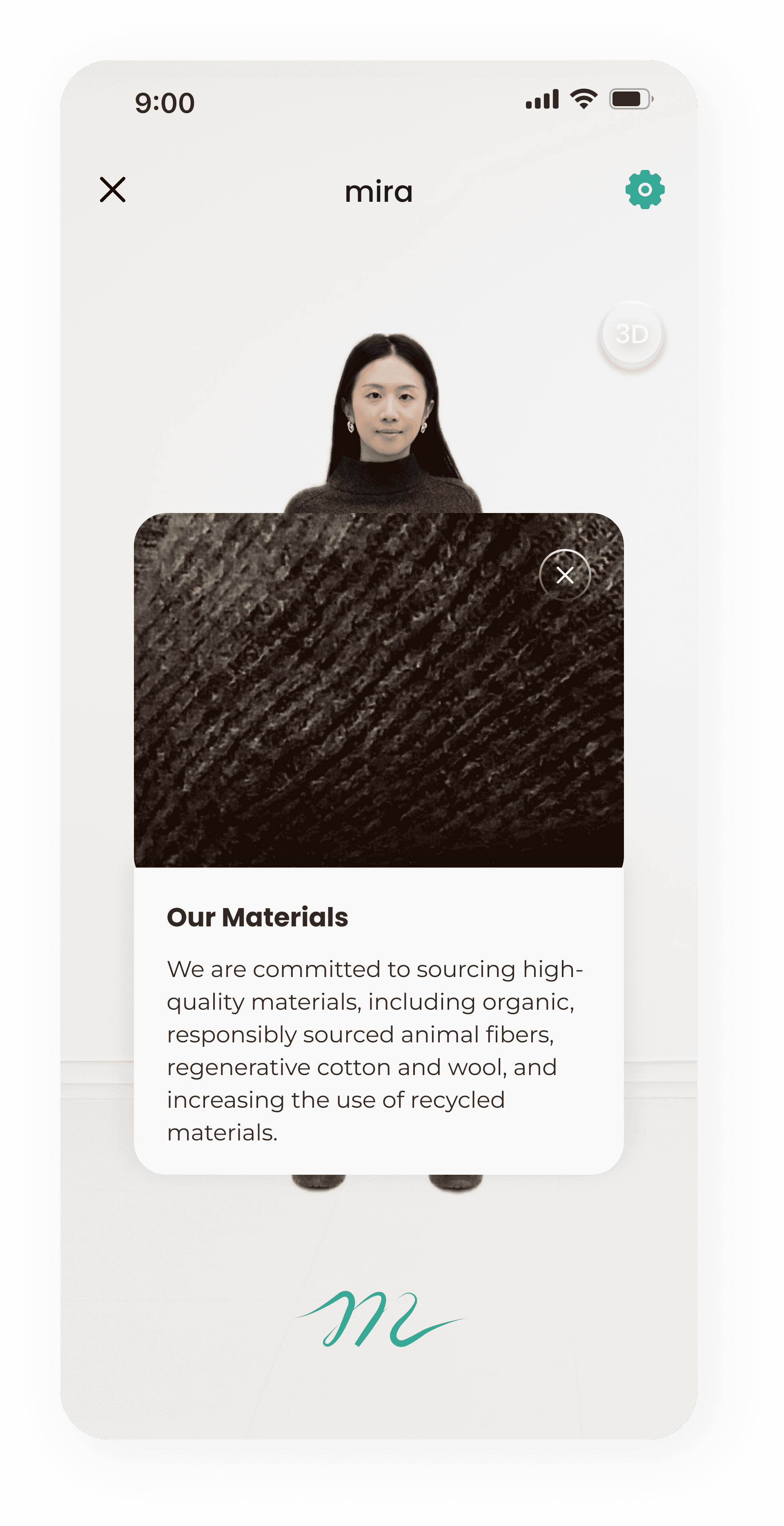
03 / Material Interaction
Feel the fabric before you choose.
TEXTURE EXPLORATION /
Touch interactions reveal texture, stretch, and fabric
construction before purchase.
DETAIL REVEAL /
Zoom into stitching, weave, lining, and material details
that product photos rarely communicate.

04 / Pre-order
Reserve it, and cancel anytime.


SMART AVAILABILITY /
Receive notifications when saved products become available again.
USER CONTROL /
Reserve instantly or cancel anytime without commitment.
1 / Before Purchase
2 / During Purchase
3 / After Purchase
Archiving with AI /
After Purchase
Build Your Living Closet
Keep, organize, and reuse every purchase.
01 / Virtual Closet
Revisit updated and saved items.


SMART ARCHIVING /
Save every purchase automatically.
QUICK RETRIEVAL /
Find past items in seconds.
01 / Virtual Closet
Create New Looks.
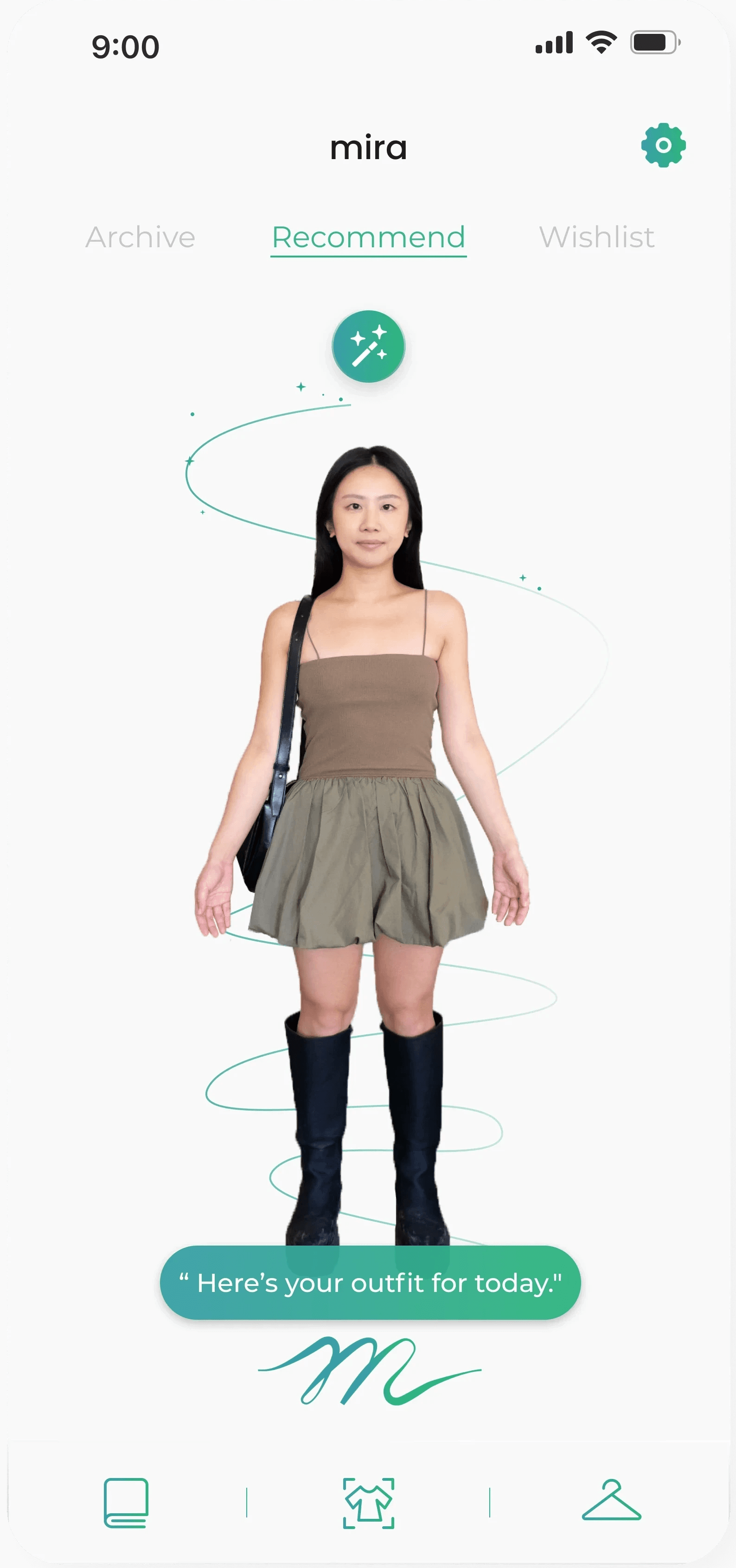


PERSONAL STYLING /
Create fresh outfits from pieces you already own.
SMART COMBINATIONS /
Mix, match, and rediscover your wardrobe with AI-powered recommendations.
THE STORY BEHIND THE PRODUCT /
Every solution has a story.
Before designing the experience, we first needed to understand where shopping decisions break down.
Here's the thinking behind it.
UNDERSTANDING THE PROBLEM /
Online shopping overwhelms the very people who love it.
We examined where online fashion decisions slow down, overwhelm users, and lose trust.
Desk Research /
Shopping takes time. Expectations are rising. AI adoption still requires trust.
79 min
Average product search time
Source / Think with Google Consumer Research
70%
Expect personalized shopping
Source / Epsilon
47%
Open to AI shopping assistance
Source / Capgemini
01 / Decision Fatigue
Discovery is becoming work.
Long search times turn discovery into effort and decision fatigue.
02 / Personalization Gap
Users expect relevance immediately.
Personalization must create value before the conversation even begins.
03 / AI Adoption Barrier
Interest exists, but confidence is conditional.
AI adoption depends on earning confidence through transparent, useful interactions.
CURRENT Product Experience Audit /
01 / First Photo Capture
When taking the photo…
First capture provides little guidance for a high-effort first step.
OBSERVED FRICTION /
Users were left with no clear guidance for positioning, framing, or confirming whether the image was captured correctly.
DESIGN IMPLICATION /
Provide clear positioning cues, real-time guidance, and visible progress states.

02 / Try-On Review
When trying the try-on…
AI-generated results are presented without a clear interpretation path.
OBSERVED FRICTION /
Users struggled to understand what the color spectrum represented, how it related to fit or sizing, and what action to take next.
DESIGN IMPLICATION /
Translate output into clear, actionable feedback with enough explanation.

15 interviews and 40+ survey responses revealed
3 recurring patterns behind shopping indecision.
Primary Research /
Research Scale /
User Interviews
15
Survey Responses
40+
Days
14
Synthesized Into
3 Behavioral Patterns
Pattern 01 /
Decision Paralysis
Saving replaced deciding.
“I end up saving so many items, but when it’s time to buy, I’m not sure which one I actually want.”
Pattern 02 /
Difficult Exploring
Lost between seeing and finding.
“I wish there was an easier way to track down products I see and get them easier.”
Pattern 03 /
Outfit Frustration
Full closets, nothing to wear.
“It’s frustrating, my closet is full, but I still feel like I have nothing to wear!”
CUI & AI INTERACTION PRINCIPLES /
To translate behavioral findings into interaction decisions, we examined established principles across conversational interfaces, human–AI interaction, and multimodal systems across the experience.
01 /
Make the system’s status visible
Users need continuous feedback about what the system is doing and whether it is ready for input.
Idle
→
Awake
→
Listening
→
Processing
→
Speaking
→
Success
⤴
Error → recovery
→ Spree AI: communicates its state through explicit visual and behavioral feedback, including a visible recovery path when interactions fail.
02 /
A consistent persona builds trust
Users select and form expectations from an AI’s voice, tone, and behavior.
P1
P2
P3
→
P2
→
Consistent Across Journey
→ Spree AI: selects one of three AI personalities, consistent across conversation tone, responses, and behavior.
03 /
Close the expectation gap
Agents fail most when users can’t tell what the system can actually do.
Set Preferences
→
Reveal Capabilities
→
Guide First Actions
→ Spree AI: establishes style preferences, brand affinity, personality, and available AI capabilities during onborading.
04 /
Keep the user in control
AI suggestions should remain reversible, editable, and easy to override.
AI recommends
→
User reviews
→
Refine · Reject · Confirm
→ Spree AI: remains user-controlled through editable size choices, cancellable pre-orders, and retryable recognition results.
05 /
Coordinate multi-modalities
Multimodal systems work when each modality does what it does best.
Voice
conversation · intent input
Vision
image recognition
Touch
precise control
→ Spree AI: coordinates multimodal experience, by voice for conversation, vision for products, touch for precise control.
PRINCIPLES → PRODUCT DECISIONS /
001
SYSTEM FEEDBACK
→
7 CUI States
Conversational State System
002
Persona Consistency
→
3 Selectable Personalities
PErsonalized PERSONA SYSTEM
003
Expectation Setting
→
Capability Onboarding
BEFORE main experience
004
User Control
→
Reversible AI Actions
DURING main experience
005
→
Voice · Vision · Touch
Cross-wide MULTIMODAL SYSTEM
Synthesis /
4 Research sources /
Market & Behavioral Research
Primary User Research
Product Experience Audit
CUI & AI Interaction Principles
↓
CORE FINDING 01 /
Decision Paralysis
Guide the purchase path
CORE FINDING 02 /
Difficult Exploring
Make finding “THAT” item faster
CORE FINDING 03 /
Outfit Frustration
Plan outfits with what users own or want
↓
Faster Product Discovery
Context-Aware Outfit Planning
research Question /
“How might we create an AI shopping assistant that helps people decide, discover, and combine with confidence?”
Framing /
The pain isn’t one moment — it spans the whole lifecycle.
Three core findings reveal distinct opportunities across the shopping lifecycle.
Pain Points → OPPORTUNITIES /
Target User Archetype /
One shopper, three main pain points.
Emma represents the recurring behaviors observed across the research.

Name
Emma
Age
32
Profile
Active Shopper
“Love discovering products, shopping is my favorite thing to do.”
Behaviors /
01
Saves many items before deciding.
02
Tracks products across platforms.
03
Struggles to coordinate outfits.
Core Need /
Confidence across discovery, purchase decisions, and everyday styling.
Keywords /
Saves before deciding
Cross-platform
Full closet
Style-led
Style-led
Shopping Pattern /
Discover
→
Save
→
Compare
→
Delay
→
Buy
→
Coordinate
Observed across her journey ↓
User Journey /
Mapping where confidence breaks down
— and where Spree AI steps in.
Emma’s confidence rises and falls across one shopping lifecycle, revealing three moments for intervention.
01 / Current Journey
Where confidence breaks down
Before Shopping
Choosing what to buy
During Shopping
Finding the right item
After Shopping
Wearing what she owns and will own
02 / Design Interventions
Where Spree AI steps in
Build User Context
Personalized Setup
Learn style, brand affinity and intent before active shopping begins.
Mira / Let's set up your style in a quick chat — I'll remember it.
Features
Persona Setup
Style Profile
Brand Affinity
Conversational Guidance
Modality
Maintain Continuity
Context-Aware Assistance
Carry user context across discovery, evaluation and purchase.
Mira / That's the jacket from your feed — here it is, in your size.
Features
Photo Recognition
Conversational Discovery
Cross-Platform Discovery
Virtual Try-On
Pre-order Support
Modality
Extend Beyond Purchase
Post-Purchase Styling
Turn owned items and purchase history into ongoing styling context.
Mira / Here are three ways to wear what you bought last week.
Features
Virtual Closet
Archive
Outfit Recommendations
Modality
CUI State System /
Designing AI states,
users can instantly understand.
Every animation communicates what Mira is doing in real time, before users even ask.
CUI State Matrix /
Calm
Dynamic
Proactive
Idle
Listening
Awake
Processing
Speaking
Success
Error
Reactive
Every conversation follows seven intentional states.
STATE TRANSITION FLOW /
01 /
Idle
→
💬“Hey MIRA”
02 /
Awake
→
💬User commands
03 /
Listening
04 /
Processing
05 /
Speaking
06-1 /
Success
06-2 /
Error
↩ recovery → Listening
recovery → Listening
→
Each state communicates intent.
Making AI behavior readable instead of invisible.
Visual System /
The design language behind Mira.
01 / Typography
Aa
Poppins
Aa
Montserrat
03 / Mira Signature

Original gradient mark · retrieved from project identity materials.
02 / Color System
Primary Green
#2EB67D
Signature Gradient
from project identity
Deep Indigo
#2E2B6D
Ink Black
#0E1217
Project palette — evidence only; the page keeps its editorial system.
04 / Components & Branding
Supportive
Focused
Playful
Tailored

Conversation Bar

Prompt Chips

Bottom Navigation


Floating Actions

Response Bubbles
While personality defines how Mira speaks, the visual system defines how users interact with Mira.
From Concept to Product /
Product Evolution
Mira Chrome Extension (2026).
The original Spree AI projcet was a four-designer team project. In 2026, I independently extended it into a working Chrome extension, collaborating with two engineers.
One-click Across Retail Sites
Personal AI Avatar System
Persistent Virtual Wardrobe

CONTEXT BEYOND THE APP /
Shopping doesn't start inside an app. Mira extends the experience directly into the user's natural browsing journey.
CONTINUOUS EXPERIENCE /
The browser extension keeps context, wardrobe, and preferences connected across retail sites without interrupting exploration.
Contribution & Reflection /
What I owned, and what I learned.
My Contribution /
Within a four-designer team that collaborated closely across the project, I drove user research and synthesis, framed the lifecycle opportunity, and defined the core feature set across Before, During, and After Purchase. I shaped the product’s information architecture and user flows, and defined how Mira — the AI persona — should behave, respond, and guide users throughout the journey. Concept development, visual design, and prototyping were shared across the team.
Outcome /
The concept evolved into a working Chrome extension (2026), built independently with two engineers.
WHAT I LEARNED /
Designing AI isn't about adding intelligence. It's about deciding where AI should support people and where users should stay in control. Building Mira reinforced that meaningful AI experiences come from preserving context, continuity, and user agency across the entire journey.